 Slides for a talk about the upcoming Green Lab Notebook (GLN) app, which was presented this morning at the International Conference on Chemistry Education (ICCE2014) in Toronto. The short presentation describes how the field of green chemistry can be brought closer to both students and professional chemists with the assistance of an accessible and easy to use mobile app. The presentation was given by Holly Hampson, since I’m currently situated much further away from the event.
mobile devices
Microsoft Word app and vector-drawn molecular graphics
 Like a few hundred million other people, I was curious to see what the newly released Microsoft Word for iPad app was capable of. One feature in particular is of great interest to me: the rendering of DrawingML graphics. It does not go without saying by any means that the app will abide to its own (very complex) format specification, but I am pleased to report that it does.
Green Lab Notebook: metrics block
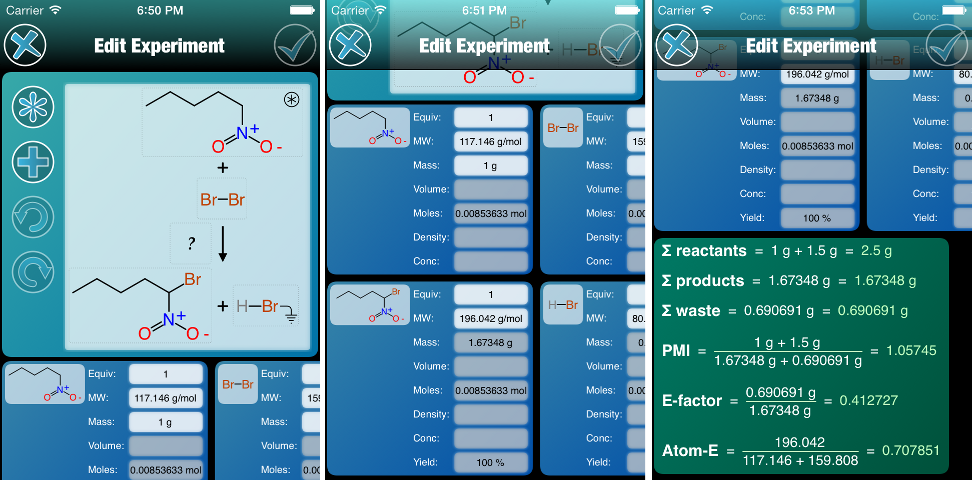 As mentioned in the previous post, the experiment editor for the Green Lab Notebook app is fleshing out. At this point, the quantity blocks are now fully operational, and they are followed up by a block describing the green chemistry metrics that are pertinent to the reaction. Continue reading
Which platform to build software for?
For most of the desktop computing era (ca. 1980-2010) software creators have had to grapple with decisions of which operating systems to build their software for. This century, any desktop application with a user interface has been a choice of Windows/Linux/MacOSX, with relative importance being dependent on the industry. Since mobile devices turned into real computers, and HTML5 found its way onto mobile browsers, the decision has moved up a level: software creators now have to start by deciding which meta-platform, i.e. desktop, mobile or web. And it’s not always an easy choice. Continue reading
Sneak preview: MMDS lookup of assays via OpenPHACTS
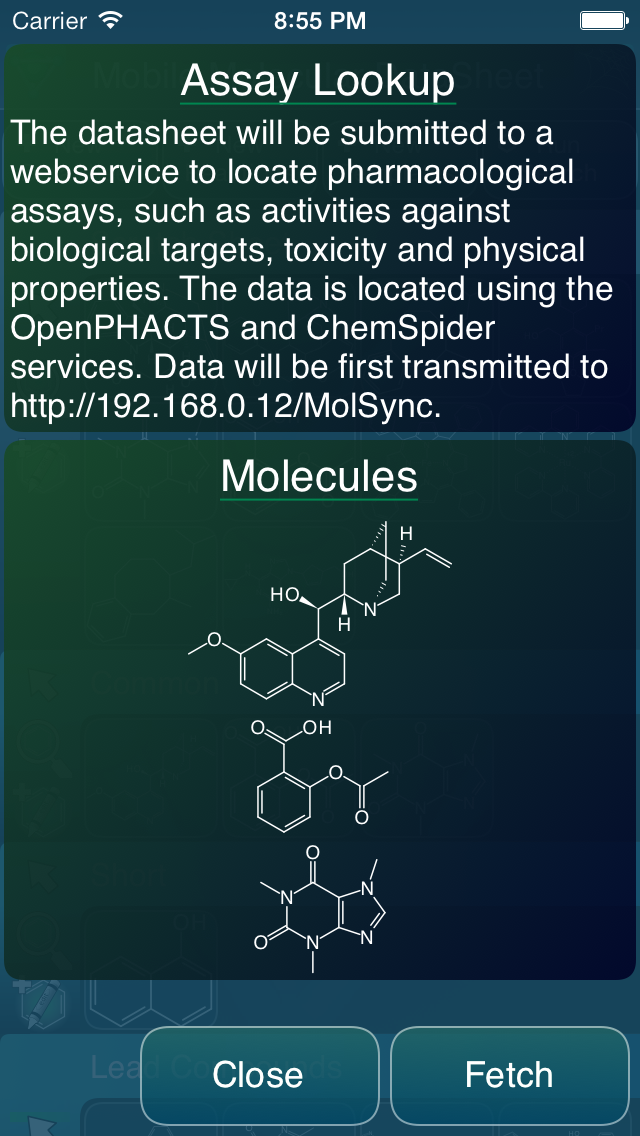 One of the features that’s slated for the next major version of the Mobile Molecular DataSheet (MMDS) is integration with OpenPHACTS pharmacological assay data. The feature is not quite ready yet, but the user interface is taking form, and is almost functional. The basic idea is that you start with a datasheet, with some number of molecules. Then, select the assay lookup feature, and a webservice intermediary cross references each of the molecular structures to the OpenPHACTS service, to pull out every available pharmacology datum, in a form that’s ready to insert into your data sheet as a new column. Looking up the data is quite easy, since OpenPHACTS is preassembled and has a very no-nonsense API, but reconciling a large number of datapoints into one or several columns of numbers is an interesting user interface workflow challenge. Continue reading
Mobile Molecular DataSheet landscape mode on iPhone
 The next major release of the Mobile Molecular DataSheet for iOS will be version 1.5, and it will include quite a few new bits, including the basic linear pipelining feature, as well as a major new service that I’ll describe later. The change that affects all of features is the migration to iOS 7, but perhaps more noticeably, when the app is used on the iPhone (or iPod) form factor, it now allows landscape mode, if you tilt your phone sideways. Continue reading
2013 redux
The year is almost over, which means it’s time for a blog post summarising all that went on as pertains to my entrepreneurial experience, in year 4 of the existence of Molecular Materials Informatics, Inc. First of all, it has been a turbulent year. Before I made the jump from a comfortable job to a new company with a bag of crazy ideas, I consumed a lot of literature about what to expect at the helm of a tech startup, and the universal opinion was that it’s a manic depressive roller coaster ride, with euphoric highs and devastating lows. I can now report that these prophecies are starting to ring true! Due to the unusual trajectory (single founder, no dependencies on hired talent, anticipated market doesn’t actually exist yet) things just hummed along quietly for the most part, until this year. While I’m not at liberty to blog about any of the details, I can focus on specific milestones, which are all part of the public record. Continue reading
Mobile Molecular DataSheet refit: icon menus and importing
 The Mobile Molecular DataSheet (MMDS) app has been out there on the appstore for quite a long time (3.5 years), and has picked up quite a few rather advanced features. Along the way it has also accumulated an equally long wishlist of things to do, and things to improve on after the original iterative attempts to get it right. The next version that is waiting for review in the appstore (1.4.9) has two most noticeable changes: icon menus on the front-facing panel, and a redesigned import process. Continue reading
Winter project: Green Lab Notebook
 The Canadian winter has announced itself, coinciding with American thanksgiving. Apart from a lot more time indoors and a significantly increased consumption of heavy stout ales, it signifies time to hunker down and concentrate on product development for awhile. Continue reading
Dynamic similarity clustering in the Approved Drugs app
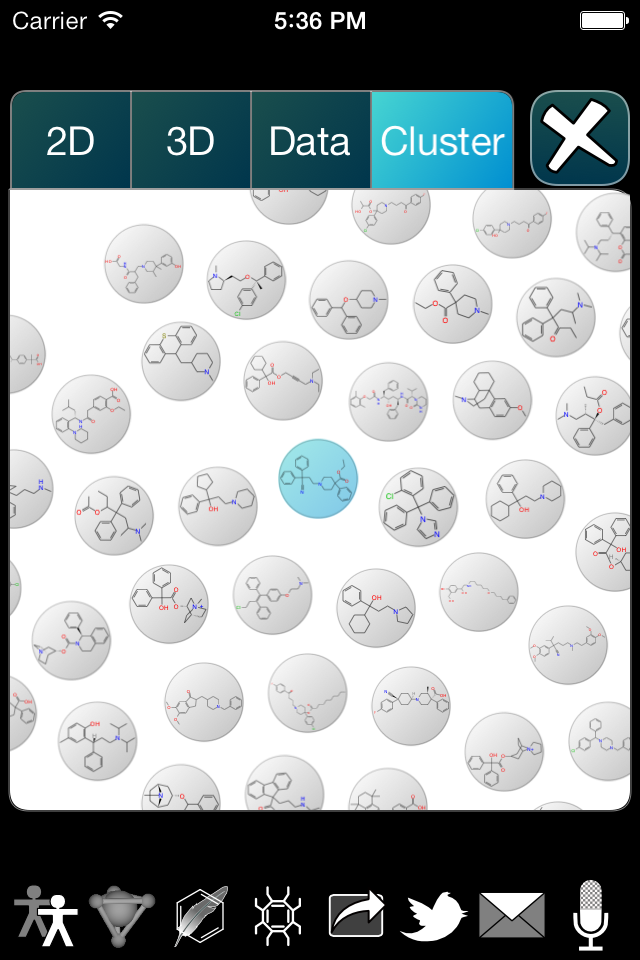 The Approved Drugs app is about to get a new update, which introduces a visual clustering feature. Initially, this is a bit of a novelty, but has a clear pathway toward a more sophisticated, high value offering. Continue reading
 Cheminformatics 2.0