Tweeting chemistry from mobile apps: one less step

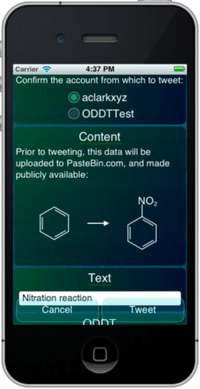
A new feature will be making its way to the Mobile Molecular DataSheet, and other apps, soon: tweeting out chemical data (molecules, reactions, datasheets) without having to login to a repository for storing the source data. All that’s required is authorisation of your Twitter account, as configured within iOS.

To see a preview of how it works, click on the image to the right, to watch a short screencast.

Continue reading

Venturing into the world of 3D

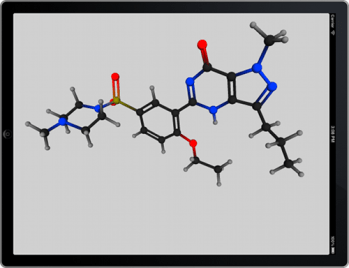
Over the last week or so, I’ve been spinning up some test code and infrastructure for supplementing my mobile apps with 3D viewing capabilities. This involves adventuring into the wild world of OpenGL ES, which is quite a maze of toolkits, meta-toolkits, versions, subsets, deprecated functions and optimisation gotchas. Nonetheless, I now have a widget capable of displaying 3D MOLfiles, and thus far allowing finger-dragging to rotate, as you can see if you click on the image to the right and watch the short screencast.

Continue reading

UI tweaks: corner tabs and general configuration settings

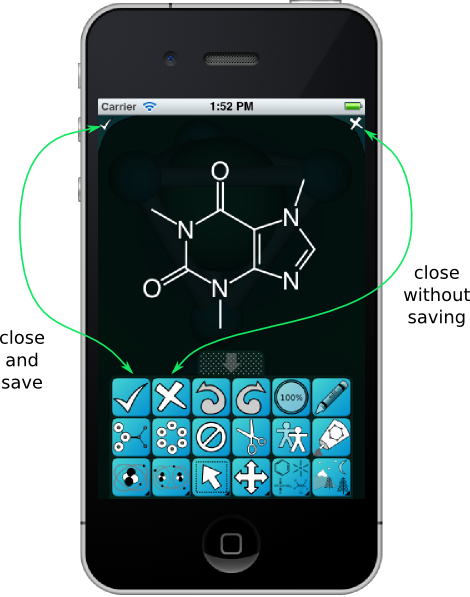
The editor panels for the MMDS app (structures, reactions and datasheets) have been augmented to include new buttons along the top corners, which can be used to close the editor. These are analogous to buttons in the main bank for close and save and close without saving. This addresses a minor but persistent inconvenience: previously, the main command bank had to be open in order to exit from any of the editor panels. Continue reading

Sneak preview: SAR Table matrix view

The SAR Table app is currently undergoing surgery to add a major new feature: the matrix view, which allows two columns to be plotted against each other, e.g. R1 vs. R2. Cells at the intersection of two values are plotted with a colour/gradient that is indicative of the response, i.e. the activity. The sample snapshot to the right displays several activity values using the “heat map” colour scheme.

The new feature is in its early stages, and the visual feng shui will certainly mutate before the next release, but the core functionality is operational. Stay tuned for the next major version.

Super Friday app update, and a positive Apple experience

Most of the apps from Molecular Materials Informatics have been updated recently, due to the iPad3: the retina-class screen has half again as many pixels as a 1080p monitor (i.e. a lot), and the performance profiles of some graphics operations have changed. A few things that were fast became slow, and so a few tweaks were necessary. A whole lot of apps got reviewed and passed in quick succession: MolPrime+, MMDS, MolSync, ODDT and ChemSpider Mobile. Others will follow soon.

Continue reading

Death to the pixels: one less Appleskeptic

Now that my iPad 3 is delivered, unpacked and synced up, I can now officially declare that my last few reservations about Apple being a positive force in the technology industry have now vanished. I’ve been looking forward to the so-called retina-class display on a large-ish screen, and it’s everything I expected.

Everybody who has seen one of these agrees that yes, indeed, it’s pretty cool, but to someone who has spent more than two decades wrangling pixels, and experiencing each technology upgrade and grinding away on techniques for driving the improvements to their limit, this is one of the most exciting developments in a very long time. Put simply, these new displays mean that pixels don’t matter anymore. All those hours we spent integer-aligning widgets, optimising anti-aliasing algorithms, dithering, keeping multiple copies of bitmaps for screen/web/print quality, making icon and sprite design compromises to work around clarity…

… all of that now gone. Now our apps can look as good as a glossy magazine, and it’s even less effort than it was before.